This is featured post 1 title
Replace these every slider sentences with your featured post descriptions.Go to Blogger edit html and find these sentences.Now replace these with your own descriptions.This theme is Bloggerized by Lasantha - Premiumbloggertemplates.com.
This is featured post 2 title
Replace these every slider sentences with your featured post descriptions.Go to Blogger edit html and find these sentences.Now replace these with your own descriptions.This theme is Bloggerized by Lasantha - Premiumbloggertemplates.com.
Tampilkan postingan dengan label Internet. Tampilkan semua postingan
31 Jan 2011
Website tidak bisa di buka di komputer kita, tapi di komputer orang lain bisa , knp ?
Posted by Admin
10.16, under Internet | No comments
Saat kita berinternet ria mengurus website kita, adakalanya website kita tidak bisa dibuka. Biasanya muncul halaman page not found, atau bener2 tidak muncul sama sekali. Kita jadi panik rasanya kiamat
kalo website kita memiliki traffic yang tinggi.
Hal yang paling sering di lakukan oleh kita sebagai user dari sebuah hosting adalah protes dan beranggapan bahwa server sedang down atau sedang mengalami masalah uptime.
Di AtriumHosting kadang kala mendapatkan komplain seperti itu, ternyata setelah saya cek, hoster lain juga mengalami hal yang sama user marah2 karena websitenya tidak bisa di akses di komputernya sendiri, tetapi di komputer lain dengan koneksi internet lain, halaman bisa muncul dengan baik.
Nah, dari pada bingung dan panik berikut ini saya sampaikan secara detail hal apa yang harus di lakukan ketika kita menghadapi masalah seperti ini.
Hal yang anda lakukan berdasarkan urutan sbb :
1. Cek dengan Proxy
Inilah hal awal yang harus anda lakukan ketika anda mendapati website anda error alias tidak bisa di buka.
bukalah www.anonymouse.org — Klik English –> Masukkan domain anda kemudian submit…
bila bisa di buka ….. Server tidak ada masalah…..
Ok, biar lebih pasti buka web proxy lain contoh: www.24proxy.com, masukkan domain anda…lihat hasilnya, jika masih OK, anda harus tersenyum
bahwa tidak ada masalah dengan server hosting anda.
Gunakan alat lain untuk mengecek status loading website anda ketika di akses dari seluruh dunia dengan cara :
klik www.host-tracker.com –> masukkan website anda…..
Nah dengan host-tracker ini maka website anda akan di coba untuk di buka dari seluruh dunia. Bila semua status is OK dan berwarna hijau. Artinya Server hosting anda dalam posisi top performance.
Dengan gt jgn protes ke tempat hosting anda ya…….. kesalahan bukan pada server . Trus knp dong ?
2. CEK IP Koneksi ke Hoster
Setiap server memiliki setting firewall yang berbeda-beda, umumnya server hosting akan melakukan blokir pada IP koneksi yang berusaha melakukan login yang salah sampai 5 x . Ini untuk keamanan cpanel anda agar tidak di hack oleh orang lain.
Caranya : buka www.myipaddress.com –> lihat Ip yang tertera , informasikan nomor IP tersebut ke tempat hosting anda seperti ini :
“Mohon di cek apakah Ip dengan nomor 117…………. terblokir di firewall server ? ” Kalo iya mohon di release.
Nah kalo memang terblokir, maka hoster akan menginformasikan ke anda dan membukakan blokir tersebut.
setelah itu coba buka website anda.
3. Clear Cookies Browser
Ingat lakukan secara berurutan agar anda tidak bingung. Step 3 ini lakukan clear browser anda dengan cara :
Firefox : Tools –> Clear recent History / cookies
Chrome : klik tanda kunci –> Option – Clear Private Data
Cobalah membuka website anda.
4. Clear Cache Komputer
Bila cara-cara di atas tidak bisa menyelesaikan persoalan anda. Lakukan langkah ini dengan cara masuk ke:
My Computer – Klik Drive C 1 x, kemudian klik kanan mouse anda
Properties –> Disk Clean Up
Setelah proses itu selesai : cari Menu Start – Run : ipconfig /flushdns , kemudian tekan RUN
Restart lah komputer anda, dan lakukan koneksi kembali. Lihat apakah berhasil atau tidak.
5. Ganti DNS
Inilah cara paling ampuh setelah semuanya tidak bisa menyelesaikan masalah, ganti dns standart anda dengan dns lain misal opendns.
Caranya :
1. Bila pake modem yang sudah ada softwarenya tinggal masukkan dns dari software tersebut , misal kalo smart tampilan seperti ini :
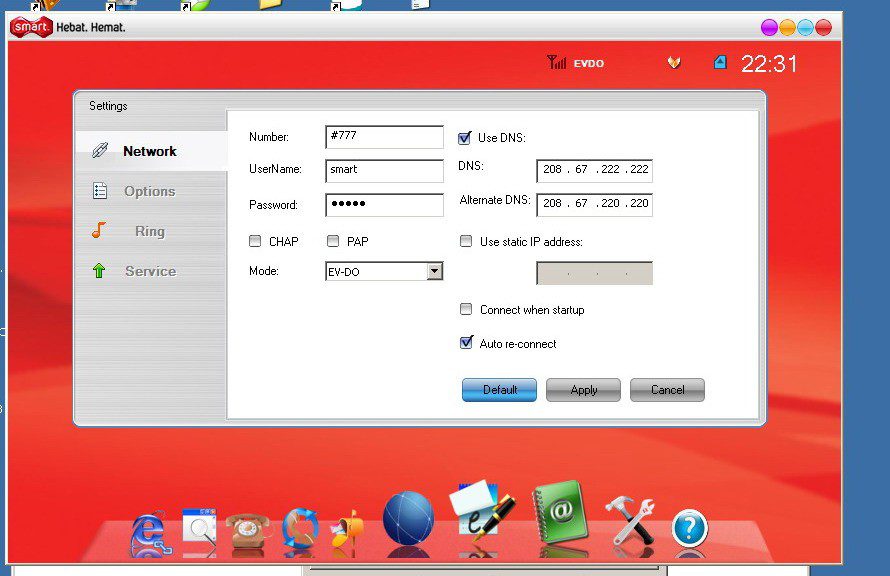
Isilah dns ip seperti itu :
208.67.222.222
208.67.220.220
atau menggunakan dns nawala sbb :
180.131.144.144
180.131.145.145
2. Bila memakai koneksi lain silahkan lakukan hal berikut :
Carilah icon komputer ( 2 komputer ) di taskbar kanan bawah anda LAN, klik kanan –> Open Network Connection
Pilihlah Koneksi yang memiliki Status Connected ( internet anda harus on ya untuk mengetahuinya )
kemudian pilih –> klik kanan –> properties –> Networking
Pilih pada Internet Protocol (TCPIP) — pilih properties , nah disitu kelihatan dns yang kosong.
Isilah dengan : 208.67.222.222 dan 208.67.220.220
Cobalah dengan cara di atas terlebih dahulu. Jalan terakhir adalah memeriksa file di dalam windows kita dengan cara :
Masuk Ke My Computer –> Drive C – Windows – System32
Carilah file “hosts”
Bila bingung pada saat anda berada di folder ini, klik lah search masukan “hosts” ( tanpa tanda petik ).
Bukalah file tersebut dengan Notepad, tekan control + F
ketikan domain yang tidak bisa di buka di komputer anda , misal atriumhosting.com
Bila disitu ada atriumhosting.com, hapuslah domain tersebut kemudian safe kembali.
Usahakan melakukan restart komputer setelah melakukan hal ini agar terjadi fresh reload systems.
Demikian informasi tutorial dari AtriumHosting.Com, semoga membantu
http://blog.atriumhosting.com/website-tidak-bisa-di-buka-di-komputer-kita-tapi-di-komputer-orang-lain-bisa-knp/
22 Jan 2011
How to Tell If Your Web Directory Is High Quality
Search engines use a variety of different methods to find your site. If you want your site to be quick to find, online directories may be the place to start. By listing your site in these directories you will be able to climb the search engine listings on sites like Google and Yahoo which will mean more visitors to your site more often. If you haven't used web directories before, it may be difficult choosing which ones to use. These tips will help you choose the best directories from the many available.
Page Rank
Big search engines use the page rank of linking sites to better determine your placement in their search results. As you choose directories remember that their page rank will affect your placement. Try to choose a directory with a high rank. Additionally, the specific page of the site where you list your site should also have a good page rank. The rankings will be on a scale of 0-10 in order of importance. The higher the number, the better the rank. Rankings are determined by site visitors and traffic as well as a variety of other factors.
Applicable Categories
Many directories place websites into categories. Make sure that the directories you choose have applicable categories for your site. If you sell electronics, don't ever list your site on a directory in any other category. If they don't have a good category fit for your site, it is better to choose a different directory. Squeezing your site into a category that isn't a good match could quickly result in negative effects.
High Quality Listings
Do you want your website to be associated with any site that doesn't offer high quality listings? It just isn't worth the risk. Check out any directory before posting your site. They should have high quality links to other great sites. If this isn't the case, move on. Search engines will associate your site with sites that it is linked to. If this website is known for bad links and spam, your site could be inadvertently grouped with it.
Attractive and Easy to Navigate
Many directory sites have ads located on their pages. This is fine. However, when a webpage is riddled with hundreds of ads, you can probably assume that their site is more about advertising income and less about being a directory. Choose a site with an attractive design so that your site will be seen.
Updated Links Being Added
The internet is filled with sites no longer in use. Many directories will let you look at some of their most recent postings. If this option is available, take the time to check out a few of the newest links. This will help you to know if these links are legitimate and most importantly, recent. Don't post your site on a site that is no longer maintained. This is simply a waste of your efforts.
If you are preparing to list your website on directory sites, take a little bit of time to do your research. This will help you to choose the best sites out there. Directories can help you to build your site if used correctly, so make sure you choose wisely.
Page Rank
Big search engines use the page rank of linking sites to better determine your placement in their search results. As you choose directories remember that their page rank will affect your placement. Try to choose a directory with a high rank. Additionally, the specific page of the site where you list your site should also have a good page rank. The rankings will be on a scale of 0-10 in order of importance. The higher the number, the better the rank. Rankings are determined by site visitors and traffic as well as a variety of other factors.
Applicable Categories
Many directories place websites into categories. Make sure that the directories you choose have applicable categories for your site. If you sell electronics, don't ever list your site on a directory in any other category. If they don't have a good category fit for your site, it is better to choose a different directory. Squeezing your site into a category that isn't a good match could quickly result in negative effects.
High Quality Listings
Do you want your website to be associated with any site that doesn't offer high quality listings? It just isn't worth the risk. Check out any directory before posting your site. They should have high quality links to other great sites. If this isn't the case, move on. Search engines will associate your site with sites that it is linked to. If this website is known for bad links and spam, your site could be inadvertently grouped with it.
Attractive and Easy to Navigate
Many directory sites have ads located on their pages. This is fine. However, when a webpage is riddled with hundreds of ads, you can probably assume that their site is more about advertising income and less about being a directory. Choose a site with an attractive design so that your site will be seen.
Updated Links Being Added
The internet is filled with sites no longer in use. Many directories will let you look at some of their most recent postings. If this option is available, take the time to check out a few of the newest links. This will help you to know if these links are legitimate and most importantly, recent. Don't post your site on a site that is no longer maintained. This is simply a waste of your efforts.
If you are preparing to list your website on directory sites, take a little bit of time to do your research. This will help you to choose the best sites out there. Directories can help you to build your site if used correctly, so make sure you choose wisely.